
Overview
The ETL Management is dedicated to configuring integrations with various data sources. Eleveo supports the regular (automatic) import of users, groups, or other data from various external sources. Support for the import of users and data includes (but is not limited to): Webex Contact Center User profiles to Eleveo User Management and historical and adherence data to Eleveo WFM.
Accessing ETL Management
Use the URL of the server to access the ETL Management: https://<FQDN>/etl where <FQDN> is the FQDN of the server where Eleveo is installed.
Note that eleveo.admin privileges are needed. Please, check ETL Management Roles to get more details about the roles and permissions for working with Integrations UI.
Adherence and Historical Data Import
Order of installation steps
Once authorization with Webex Contact Center is successful and the User Sync task is configured properly import of historical data and adherence can be configured.
An automatic import of historical data from Webex Contact Center into Eleveo WFM can be achieved by configuring the Historical data and Adherence tasks in ETL Management.
The forecasting tool helps to predict contact center workload and staffing requirements based on historical data. This is a key prerequisite for the scheduling tool that creates an actual agent schedule optimized to fulfill the forecasted contact center load. There are multiple ways to predict the contact center workload. We use call volumes and average handling time (AHT) for each queue aggregated to 15 minutes intervals.
Schedule adherence is a workforce management metric that tells how effectively an agent follows their schedule. Historical adherence compares the agent's schedule with their actual behavior, e.g., when the agent was available for the call (or handling a call) when they went for a break or lunch, etc., and creates reports.
Historical Data
The Automatic Import of Historical and Adherence Data of Historical data allows to get information such as names and IDs of the queues, start and handle time, number of tasks offered to the queues. Those data can be used for the forecasting process in WFM.
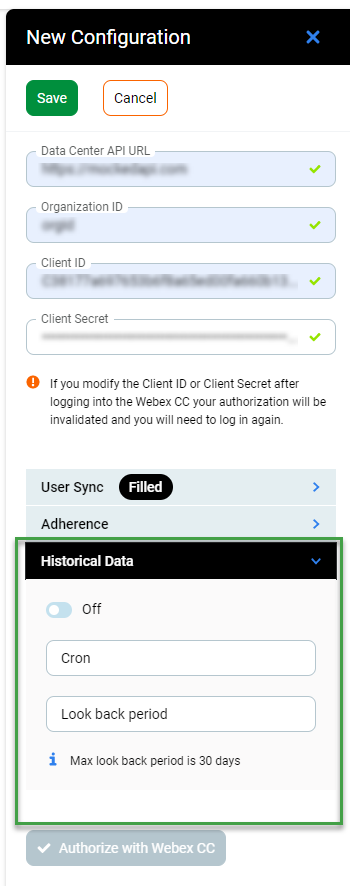
The following configuration can be performed for the task:
-
On/Off - the task can be configured and active or inactive
-
Cron - cron expression that specifies when the current task should be started
*
*
*
*
*
minute (0-59)
hour (0 - 23)
day of the month (1 - 31)
month (1 - 12)
day of the week (0 - Sun, 1 - Mon etc)
To validate cron expression use the link.
Cron job uses the server's define timezone that is UTC. You can check time on the server by typing following date command in terminal:
date -u
-
Look back period - max 30 days - time period that determines how many days of data from history will be imported.
Adherence
Adherence data are the data from the Contact Center about agents' statuses that can be used for planning purposes in the WFM application.
Schedule Adherence is a retrospective reporting tool that allows supervisors to check the person's adherence to a schedule in the specified date range in the past. It uses reporting data from an external source and compares it with the schedule for the same date range.
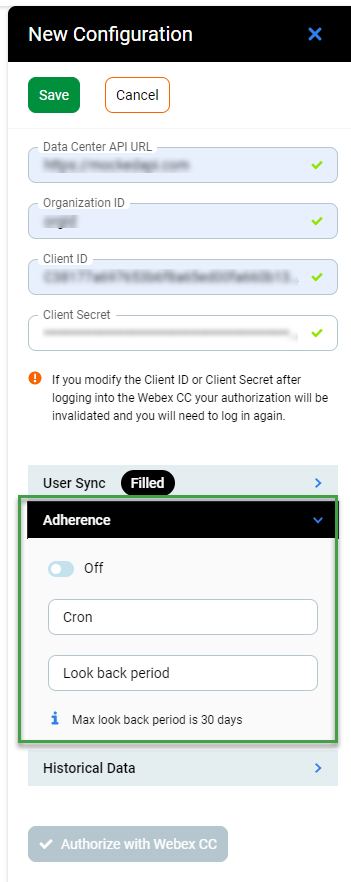
The following configuration can be performed for the task:
-
On/Off - the task can be configured and active or inactive
-
Cron - cron expression that specifies when the current task should be started
*
*
*
*
*
minute (0-59)
hour (0 - 23)
day of the month (1 - 31)
month (1 - 12)
day of the week (0 - Sun, 1 - Mon etc)
To validate cron expression use the link.
Cron job uses the server's define timezone that is UTC. You can check time on the server by typing following date command in terminal:
date -u
-
Look back period - max 30 days - time period that determines how many days of data from history will be imported.