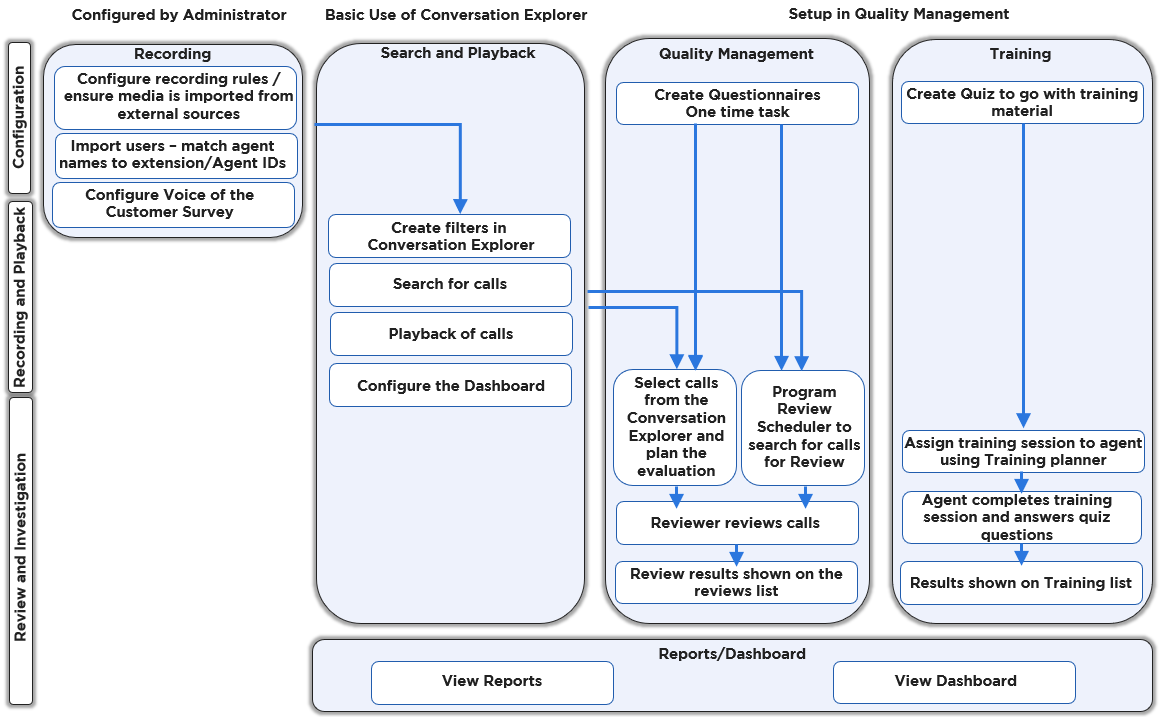
This page provides a simplified overview of commonly implemented workflows for Quality Management.
Depending on your use case follow one of the paths below:
Preconditions for Quality Management
Conversations must be imported from Media Capture modules or from other data sources (such as Salesforce, for example).
Recording Rules must be defined by an administrator in call center environments, the system must be configured for recording and playback of media.
Search and Playback / Conversation Explorer
-
Log into Quality Management (follow the instructions on the Login page).
-
Search for calls / create filters on the Conversation Explorer screen (find more details on the Conversation Explorer page).
-
Playback media from the Conversation Explorer .
-
Configure the Dashboard (follow the instructions on the Dashboard page).
Quality Management
-
Create questionnaires, as described on the Questionnaires page (this is a one time task).
-
Select a call from the Conversation Explorer and plan an evaluation (find more details on the Using the Reviews Screen ).
-
Program the Plan Manager to search for calls to review (find more details on the Plans Manager ).
-
-
Reviewer completes a review using the Grading Form (find more details on the Using the Reviews Screen page).
-
Results are visible on the Reviews screen (more details: Using the Reviews Screen ) or in the Review Volume Report.
Use Trainings
-
Create a training/quiz to go with the training material (find more details on the Creating a Training Questionnaire page).
-
Assign a training session to an agent using the Training Planner (find more details on the Planning a Training page).
-
Agent completes the Training (find more details on the Taking a Training page).
-
Search and review the results of the training (find more details on the Searching and Exporting Trainings page).
The diagram below provides a general overview of the workflow for tasks within Eleveo Quality Management: