
Overview
As an alternative to using Eleveo Data Importers, historical data can be imported using the provided API. This page describes the API, its endpoints, and usage examples.
The API requires authentication. As a result, uploading historical data to WFM consists of two steps:
-
Requesting and getting an authentication token.
-
Uploading the token and data to the API.
Prerequisites
As a prerequisite, the Provider Client must be added in User Management. Follow the procedure described on the Managing Provider Clients page and note the Client ID and Secret values – they are required when requesting the token.
The same Provider Client can be used for Custom Import of Adherence Data Using API.
API Endpoints
The following API endpoints exist:
-
Get Access Token: http://<host>:<port>/auth/realms/<tenant>/protocol/openid-connect/token where:
-
<host> is an address or a name of the server where WFM is running.
-
<port> is a port opened on the server where WFM is running.
-
<tenant> is the name of the realm (if not sure what the tenant name is, check the URL of the Eleveo applications:
<tenant>.myeleveo.com).
-
-
Send historical data to WFM: http://<tenant>.<host>:<port>/_rest/forecasting/historical-data/historical-data-push where:
-
<host> is an address or a name of the server where WFM is running.
-
<port> is a port opened on the server where WFM is running.
-
<tenant> is the name of the realm (if not sure what the tenant name is, check the URL of the Eleveo applications:
<tenant>.myeleveo.com).
-
Requesting and Getting the Token
The table below shows an example HTTP request with the relevant header attributes and body for obtaining an access token. Replace the example parameter values with the relevant settings. Use a third-party application or the curl command to send the request.
|
Action |
HTTP Method |
Endpoint |
Header |
Body |
|---|---|---|---|---|
|
Get Access Token |
POST |
http://<host>:<port>/auth/realms/<tenant>/protocol/openid-connect/token |
Content-Type: application/x-www-form-urlencoded |
{ grant_type: client_id: <Client ID from Client Provider in User Management> client_secret: <Secret from Client Provider in User Management>} |
Sample response:
"access_token": "eyJhbGciOiJSUzI1NiIsInR5cCIgOiAiSldUIiwia2lkIiA6ICJXUzRxalJCZmUxRk4xa3UxakszcWpNS1pQQUJHNzdIQzBwSXlISXgxc0tRIn0.eyJqdGkiOiIyMDMzMWRjMi00NmZlLTQxMjQtYWZmZS0yYzllNWFmMGFjYzQiLCJleHAiOjE1OTAxMzUyNjUsIm5iZiI6MCwiaWF0IjoxNTkwMTM0OTY1LCJpc3MiOiJodHRwOi8vc3NvLmRldjA2My5kZXYuem9vbWludC5jb206MzA3MTcvYXV0aC9yZWFsbXMvZGV2MSIsImF1ZCI6IndmbS1hZG1pbmlzdHJhdGlvbi1hcHAiLCJzdWIiOiI0OTRmZWNkMS00ZTZmLTQwZTAtYTQxOC00OTNlZTQzYmUzN2UiLCJ0eXAiOiJCZWFyZXIiLCJhenAiOiJ3Zm0tZm9yZWNhc3RpbmctYXBwIiwiYXV0aF90aW1lIjowLCJzZXNzaW9uX3N0YXRlIjoiNjQ2MjRlZTctNjlmZS00YTEyLTljY2MtZjc1Y2ZiYzExY2I5IiwiYWNyIjoiMSIsInJlc291cmNlX2FjY2VzcyI6eyJ3Zm0tYWRtaW5pc3RyYXRpb24tYXBwIjp7InJvbGVzIjpbIldGTV9WSUVXX1FVRVVFIiwiV0ZNX0NSRUFURV9RVUVVRSJdfSwid2ZtLWZvcmVjYXN0aW5nLWFwcCI6eyJyb2xlcyI6WyJXRk1fREVMRVRFX0ZPUkVDQVNUIiwiV0ZNX0hJU1RPUklDQUxfREFUQV9QVVNIIiwiV0ZNX0NSRUFURV9GT1JFQ0FTVCIsIldGTV9WSUVXX0ZPUkVDQVNUIiwiV0ZNX0VESVRfRk9SRUNBU1QiLCJXRk1fRklMRV9VUExPQUQiXX19LCJzY29wZSI6ImVtYWlsIHByb2ZpbGUiLCJjbGllbnRJZCI6IndmbS1mb3JlY2FzdGluZy1hcHAiLCJlbWFpbF92ZXJpZmllZCI6ZmFsc2UsImNsaWVudEhvc3QiOiIxMC4zMi4wLjEiLCJwcmVmZXJyZWRfdXNlcm5hbWUiOiJzZXJ2aWNlLWFjY291bnQtd2ZtLWZvcmVjYXN0aW5nLWFwcCIsImNsaWVudEFkZHJlc3MiOiIxMC4zMi4wLjEiLCJlbWFpbCI6InNlcnZpY2UtYWNjb3VudC13Zm0tZm9yZWNhc3RpbmctYXBwQHBsYWNlaG9sZGVyLm9yZyJ9.bmcfw_Afwfek_SswhdKPAXImLigcVC3vfPjvR3TOMW1DwYSLiFtodEyzo200V-EwLVKQR2wXjCNfAFMCRYiaR3b4B3peT6cra9dVYXaU8pwfqpXmJb1IdxAxHvlu8fVjBJfiOyIZ6N2mFmTXqUqucioAFv2wD6LkrcpR1QXQcBzwKtb87xemSWL1NivAHUjz-wgg_-x5qAGfJofqQUI7F00Img2VmhkJfac1YWnBAcPaNEm0RGeVlANB1gL77C1opHrSBIUDzk56JaiR2WDjHPheSxo4CGKfTo0rp9dq3hK5jYU62KY8sAjADMy3j6dfE3zSfgehzaXVNyug2AE-7Q",
    "expires_in": 300,
    "refresh_expires_in": 1800,
    "refresh_token": "eyJhbGciOiJIUzI1NiIsInR5cCIgOiAiSldUIiwia2lkIiA6ICJjYzEzZmFhOS0yZmY4LTQyZjYtODQxYS0yMzY5ODIyMDQ2ZWMifQ.eyJqdGkiOiJmZGJjNTlkYi0yYzFiLTRmOTQtOTZjNC00ZDc3NjE0YzdhZmUiLCJleHAiOjE1OTAxMzY3NjUsIm5iZiI6MCwiaWF0IjoxNTkwMTM0OTY1LCJpc3MiOiJodHRwOi8vc3NvLmRldjA2My5kZXYuem9vbWludC5jb206MzA3MTcvYXV0aC9yZWFsbXMvZGV2MSIsImF1ZCI6Imh0dHA6Ly9zc28uZGV2MDYzLmRldi56b29taW50LmNvbTozMDcxNy9hdXRoL3JlYWxtcy9kZXYxIiwic3ViIjoiNDk0ZmVjZDEtNGU2Zi00MGUwLWE0MTgtNDkzZWU0M2JlMzdlIiwidHlwIjoiUmVmcmVzaCIsImF6cCI6IndmbS1mb3JlY2FzdGluZy1hcHAiLCJhdXRoX3RpbWUiOjAsInNlc3Npb25fc3RhdGUiOiI2NDYyNGVlNy02OWZlLTRhMTItOWNjYy1mNzVjZmJjMTFjYjkiLCJyZXNvdXJjZV9hY2Nlc3MiOnsid2ZtLWFkbWluaXN0cmF0aW9uLWFwcCI6eyJyb2xlcyI6WyJXRk1fVklFV19RVUVVRSIsIldGTV9DUkVBVEVfUVVFVUUiXX0sIndmbS1mb3JlY2FzdGluZy1hcHAiOnsicm9sZXMiOlsiV0ZNX0RFTEVURV9GT1JFQ0FTVCIsIldGTV9ISVNUT1JJQ0FMX0RBVEFfUFVTSCIsIldGTV9DUkVBVEVfRk9SRUNBU1QiLCJXRk1fVklFV19GT1JFQ0FTVCIsIldGTV9FRElUX0ZPUkVDQVNUIiwiV0ZNX0ZJTEVfVVBMT0FEIl19fSwic2NvcGUiOiJlbWFpbCBwcm9maWxlIn0.03-IhDoWsXfBCkmj1l6rv7U9XNBu_vw2zpirrEPnxPc",
    "token_type": "bearer",
    "not-before-policy": 0,
    "session_state": "64624ee7-69fe-4a12-9ccc-f75cfbc11cb9",
    "scope": "email profile"
Uploading Data to WFM
Data can be uploaded in two ways:
-
as a single request
-
as a chunked request
Single Request
When a small amount of data is sent to WFM (for example, an incremental upload), data can be sent in one request. In such a case, set the query parameters:
-
pushToken: A unique identifier of the operation (UUID), generated as described on Wikipedia: Universally Unique Identifier -
source: The name of the ACD from which data is uploaded. -
lastChunk: A flag that identifies if the chunk is the last in the sequence. For a single request, set this totrue.
The import is considered complete (and displayed in the import history list on the Data Import screen) after the request with the lastChunk=true parameter is sent.
Chunked Request
When a large amount of data is sent to WFM (mainly in the initial or as a full upload), it is better to split one big upload action into smaller requests/chunks. Divide the data into several parts to send them in separate requests. Set the parameters of the requests in the following way:
-
All chunks related to the same upload operation have the same
pushTokenandsourceparameters (chunks of one upload request are identified based on thepushTokenquery parameter). -
The
lastChunkparameter equalstrueonly in the last chunk in the sequence. In all other chunks, it is set tofalse.
The import is considered complete (and is displayed in the import history list on the Data Import screen) after the request with the lastChunk=true parameter is sent.
API Definition
Use a third-party application or the curl command to send a request. Include the token obtained in the previous step.
|
Action |
HTTP Method |
Endpoint |
Header |
Query parameters |
Body |
|---|---|---|---|---|---|
|
Historical Data Push |
POST |
http://<tenant>.<host>:<port>/_rest/forecasting/historical-data/historical-data-push |
Content-Type: text/csv Tenant-ID: <name of the realm> Authorization: Bearer <token received in the previous step> |
pushToken: unique identifier of the operation (UUID) for each upload sourceId: name of the ACD from which data is uploaded lastChunk: flag that identifies if the chunk is the last in the sequence historicalDataInterval: (optional) the length of the interval between values in the CSV file in seconds; possible values are: |
Body text is an input stream with a specific file format, as described on the File Format page, for example: 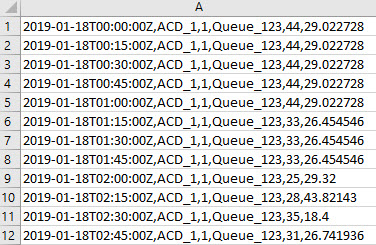
|
Historical data must cover the whole day from 00:00 to 24:00 in 15-minute intervals, even if values for some intervals are zero. If any gaps exist, data is uploaded but forecast creation based on that data fails.