
Supported for CLOUD Deployments – On-Premise Deployments are supported if installed by Eleveo Support Engineers. Please contact your Eleveo representative to discuss a custom deployment if you require an on-premise installation.
What is it
Eleveo offers a Speech Generative AI package that is installed on a separate, dedicated, server. The Generative AI server creates a summary of the conversation (based on the transcription created by Eleveo Speech Recognition), and answers predefined questions about the conversation that were created by users(in the Automated Rules module). Quality Management then uses the answers to those user-created questions to score the conversation using Automated Rules. A similar approach is used to determine Topics and to provide an AI Rating for each conversation.
Combining the transcriptions provided by Eleveo Speech Recognition with Speech Generative AI and Automated Rules allow for 100% of conversations to be assessed and scored by Quality Management.
The solution is provided for on-premise and cloud deployments. Feature availability may vary based on your installation.
Description of Speech Generative AI Features
Summaries, Highlights, and Next Steps
In fast-paced contact centers, important information can often get lost amid continuous conversations. Eleveo’s Generative AI Summary, Highlights, and Next Steps feature addresses this challenge by automatically generating clear summaries, key highlights, and concise next steps for every conversation. By turning raw conversation data into structured insights, Eleveo enhances the efficiency and customer-centricity of contact centers. Eleveo processes every customer interaction and automatically generates a clear, human-like summary, a set of key bullet-point highlights, and a concise list of next steps - agreements or action items reached between the customer and the agent.
-
Summary – A brief summary of the conversation (up to 300 characters) is generated by the Speech Generative AI service, with speakers in the conversation identified as
Participant 1orParticipant 2if the summary would otherwise contain a name or other identifying information. An example summary: “Participant 1 stated that they have a technical issue with the product. …..” -
Highlights – Key points taken from the conversation are listed, this is not a summary but important topics/events in the conversation.
-
Next steps – The system lists key points requiring follow-up or recommendations made.
Topics
AI-powered Topic detection revolutionizes the way contact centers manage customer interactions by automatically categorizing conversations into key topics. Gone are the days of tedious manual reviews; Eleveo intelligently tags each interaction with up to three predefined topics, allowing your team to focus on what matters most—be it billing, cancellations, or tech support. With a customizable topic list and rapid data analysis capabilities, you can easily track trends, make informed decisions, and enhance quality assurance initiatives. Transform chaos into clarity and drive meaningful insights effortlessly with Eleveo.
AI Rating (with explanation)
Eleveo’s AI Rating transforms the measurement of customer satisfaction (CSAT) by predicting satisfaction scores for every interaction. This approach surpasses traditional surveys, which only gather feedback from a limited number of customers. Eleveo provides a 1 to 5-star rating based on the content and tone of conversations, delivering clear and actionable insights alongside explanations for each score. This enhances transparency and trust in the assessment process. By incorporating Eleveo’s AI predictions into your systems, you gain valuable visibility throughout the customer journey. In an environment where customer perception is crucial to success, comprehending each interaction is vital.
The Speech Generative AI server evaluates every conversation with the question: “Can you assess the quality of service provided in this conversation and assign a score from 1 to 5, with 5 being the highest?” The resulting score and a brief rationale for the assigned score are displayed in the Details Pane of the Conversation Explorer.
Flags
Eleveo’s combines Generative AI and Speech Recognition to deliver insights into every customer interaction. Analyzing 100% of conversations helps teams identify critical moments of tension and satisfaction. This enables effective coaching and real-time performance improvement. Unlike standalone text analysis, Eleveo captures the tone, pace, and intensity of speech, identifying cues from both the customer and the agent across the entire interaction. Using these cues the sentiment (positive, neutral, negative) for the overall conversation is displayed as a flag within the conversation details pane. The overall sentiment of the conversation is shown using a predefined flag(s). Relevant flags are highlighted (in blue) if detected. If not detected, the flags are not highlighted nor shown by default. AI Flags transforms customer retention strategies by proactively identifying churn risks during interactions. It analyzes conversations for signals of customer dissatisfaction, enabling teams to address potential issues before they escalate. Additionally, it detects when customers wish to escalate concerns, ensuring swift and effective responses to enhance service experiences. The system also recognizes repeat contacts, highlighting unresolved issues that can inform improvements in service workflows and increase customer satisfaction. Overall, Eleveo’s approach fosters loyalty and operational efficiency through proactive engagement.
Default flags include: Overall sentiment(Positive, Neutral, Negative), Churn risk identified, Escalation requested, and Repeat contact.
Automated Quality Management – Automated Rules
Eleveo’s Automated Quality Management, driven by Generative AI, revolutionizes the process by evaluating 100% of interactions across multiple dimensions, such as emotion, sentiment, and acoustic signals. With customizable prompts, you can effortlessly assess compliance, product offerings, and customer engagement without any coding. Benefit from a comprehensive 360° conversation analysis and proactively identify issues before they escalate. Free your teams to focus on coaching and insights while Eleveo provides consistent evaluations.
Automated Quality Management (AQM) is able to automatically evaluate all call-based conversations available within the Quality Management application. The Automated Rule builder allows you to create rules that assess all conversations (or a subset of conversations) and assign a score to individual conversations. Multiple rules and their final score can be used to gain better insight into your contact center operations. Results are displayed directly within the Conversation Explorer, you may then search for Conversations based on their score. Automated Rules help to find underperforming agents, outstanding agent performance, questionable interactions, or unexpected issues that may otherwise go unnoticed in the contact center.
Use Automated Quality Management (AQM) to:
-
Find specific (problematic) conversations and better understand the needs of customers.
-
Focus on a lack of expertise in key areas within your contact center teams.
-
Provide feedback and guidance to agents.
-
Assess agent performance or adherence to specific requirements.
Multilingual Support
As of version 10.0, Eleveo Speech Generative AI supports multiple languages.
The system will generate summaries and other select outputs in the language defined by an administrator. Users can use the selected language when creating Automated Rules for Automated Quality Management.
Languages Tested and Verified For Generative AI Outputs
Eleveo tests the following langaages as part of the regular development process. Other languages are supported, but should be validated on a case-by-case basis before being deployed to a producion environment.
-
Arabic
-
Czech
-
English
-
Polish
-
Spanish
Output By Language
-
Summaries – Language of transcription as defined in the configuration
-
Insights – Highlights and Next Steps – Language of transcription as defined in the configuration
-
AI Rating Explanation – Language of transcription as defined in the configuration
-
Topics – English Only
-
AI Rating – English Only (numerical value)
-
Flags – English Only
-
Automated Quality Management – Automated Rules – Language of transcription as defined in configuration
Known Limitations
-
Please be aware that given the nature of large language models the output may not always be provided in the language of choice, the system may occasionally provide responses in English. This is especially the case for transcription files that contain two languages, for example when the conversation starts in one languages and switches later on to a second languages.
-
Settings must be adjusted for Arabic language in order for the vLLM to respond reliably.
-
When multiple languages are used across a conversation and there are multiple transcription files the language of the last transcript will be used by the system.
High-level Architecture Overview
Speech Generative AI is installed as an add-on to Quality Management and must be configured. This feature analyzes transcription files provided by the Speech Recognition Service and answers user-defined questions about the transcription. Quality Management combines the score with other variables/values based on the user-defined Automated rules. The combined scores are visible within the Conversation Explorer details pane as part of the automatic reviews results.
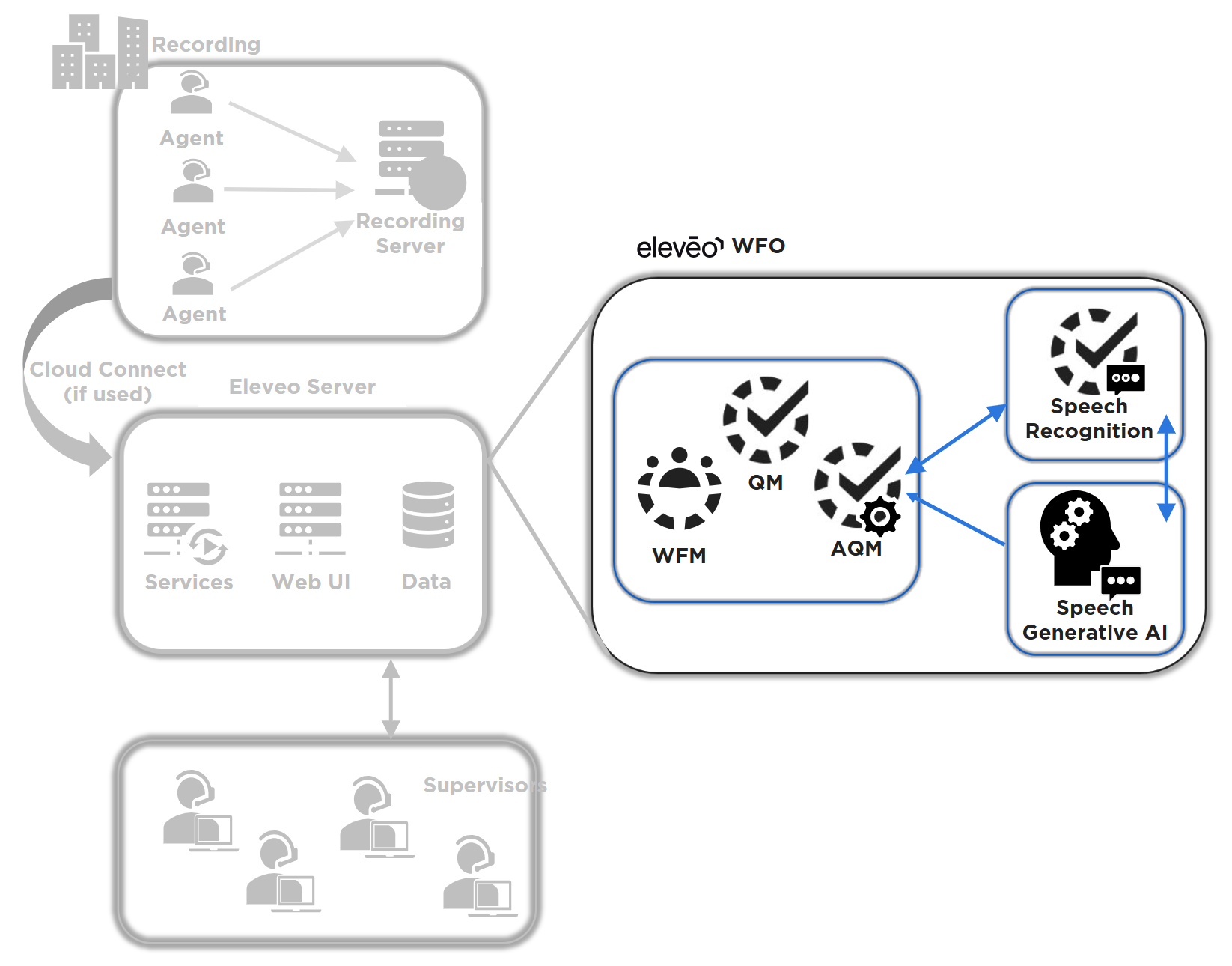
Chats and emails are not processed by Eleveo Speech Generative AI. Only transcriptions generated by Speech Recognition are sent for processing.
Detailed Visualization of Architecture
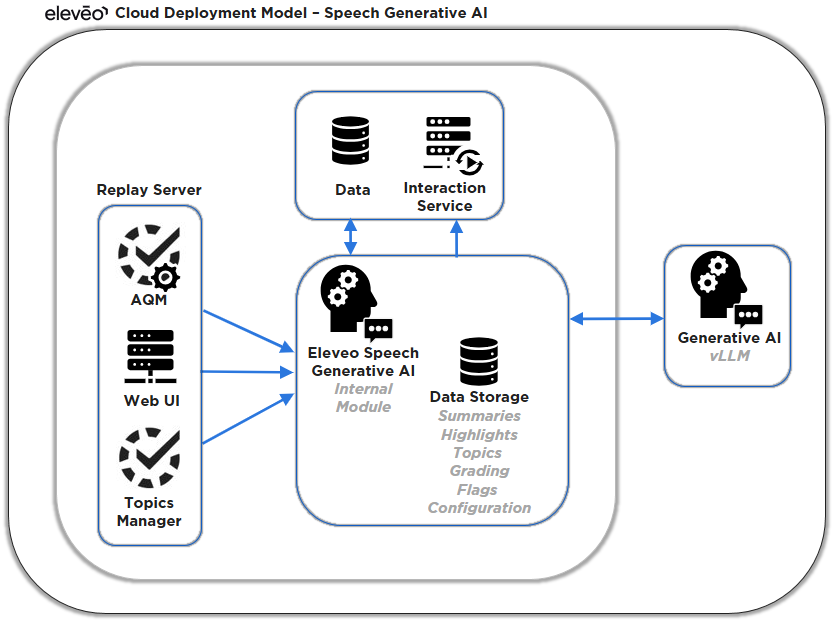
Speech Generative AI is dependent on Transcription files provided by the Speech Recognition server. Once the transcription file is available, the system sends it for processing.
The request is sent to the Speech Generative AI Server (marked by the label vLLM in the diagram below) along with any additional requests that will be processed by the Generative AI server (vLLM). Additional requests include; predefined Topics, specific questions associated with the AQM scoring, a summarization request, and any additional configuration required.
Responses from the Speech Generative AI server are stored in the database and made available to be displayed on the Conversation Explorer.
Supported Integration Use Cases
-
Conversation Explorer – Display summaries created by the Generative AI within the Details Pane. Summaries are generated based on the transcription provided by Eleveo Speech Recognition.
-
Quality Management – Provide responses to questions defined by users as part of Automated Rules.
Unsupported features:
-
Email and Chats are not supported by Speech Generative AI
-
Video calls are not processed at this time
-
Historical media/recordings are not processed - only new recordings are processed by default
Supported / Unsupported Scenarios
-
All new recordings that are processed by Speech Recognition (and have a transcription generated by Speech Recognition) are supported.
-
Historical media/recordings are not processed.
-
Archived media is ignored by Speech Recognition and Speech Generative AI and will not be (re)processed.
What Is Supported
|
Feature |
Recording |
Screen
|
Upgrade to video |
User Import |
User Authentication
|
SSO |
Conversation Explorer |
QM(Reviews) |
Speech
|
Live
|
Voice of the
|
WFO Analytics
|
WFM (historical data)
|
WFM Intraday |
WFM Real Time Adherence |
|---|---|---|---|---|---|---|---|---|---|---|---|---|---|---|---|
|
Speech Generative AI |
|
|
|
|
|
|
|
|
|
|
|
|
|
|
|