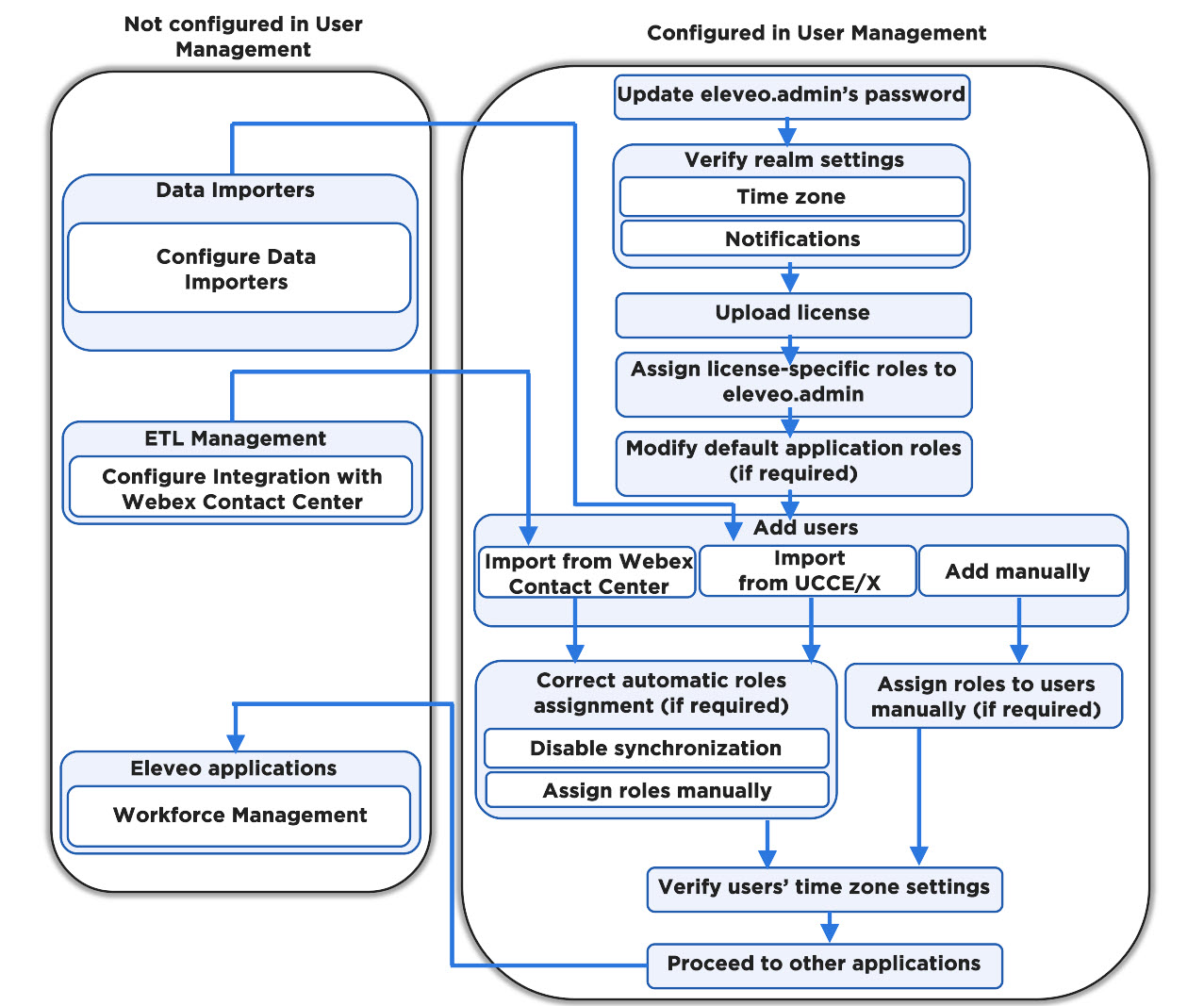
Follow the steps to configure User Management and enable connected applications:
-
Log in for the first time as eleveo.admin and change the password.
-
Verify the realm settings and update if needed:
-
Default time zone
-
Notifications about the expiration of licenses
-
-
Upload licenses (or verify if licenses are correctly uploaded). The WFM application should be already deployed before proceeding with User Management, based on licenses obtained.
-
Assign the eleveo.admin application-specific roles which are necessary to manage the WFM application if required.
-
Configure Provider Clients for Users Data Providers (if users will be imported automatically to User Management) and/or Historical Data Providers (if historical data will be imported to WFM).
-
Add users:
-
Automatically from UCCX/E
Important: Set the Data Providers' configuration files, adding the correct roles mappings
-
-
Assign roles to local users manually if required.
-
If required, correct automatic roles assignment:
-
Verify if each user has the correct time zone set. (Note that users can set their time zones by themselves in their User Profile).
-
Proceed to the WFM User Guide to start using the application.
The diagram below indicates how the tasks performed within the Eleveo User Management application and externally are related: