Purpose
This page describes the available recording methods, the general system architecture, and the types of media that can be recorded.
Configuration details and supported use cases are provided in separate sections.
Cisco Recording Methods
There are two methods:
-
Passive Recording with JTAPI signaling is an improved version of passive recording.
Useful for installations with phones that don't support silent monitoring (phones without built-in bridges).-
CUBE Active SIP Recording
-
-
Active Recording with JTAPI offers the best functionality and reliability on a Cisco platform. It is recommended whenever possible.
The one JTAPI process can handle a maximum of 2500 devices. To observe more than 2500 devices, create an additional JTAP user.-
Cisco Selective User Recording
-
Cisco Basic Selective Silent Recording
-
Cisco Active Recording Integrated With UCCE
-
Active Recording Integrated With UCCX
-
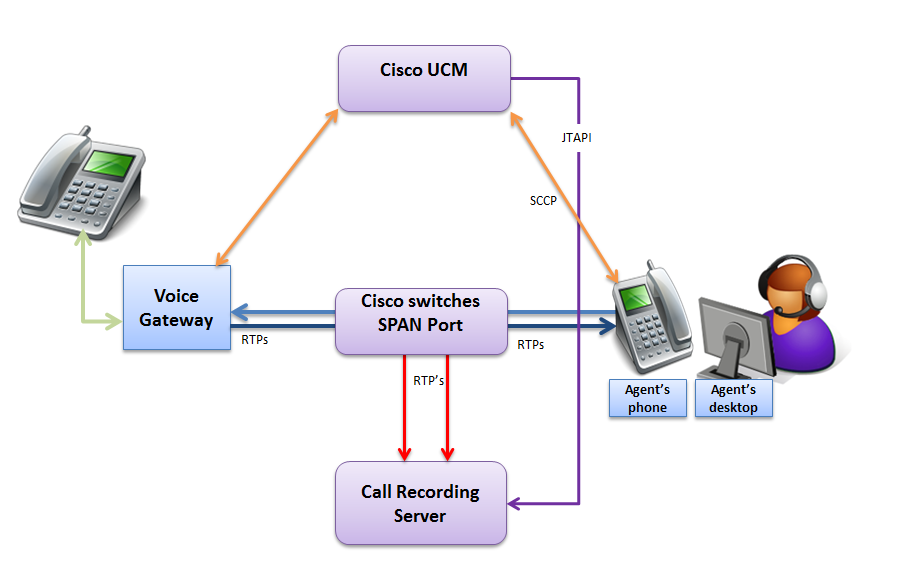
Passive Recording
An active call detection requires interconnection with a soft switch via the Computer Telephony Integration (CTI) protocol.
The CTI interface provides information about call events.
Voice media are captured from the network through a SPAN port. Direct support on the soft switch is needed to provide call events.
Advantages:
-
Through the use of JTAPI signaling to detect the calls, Call Recording can capture the RTP streams for more complicated scenarios. For example, Conferences.
-
Through the use of RSPAN and VLAN, you can direct the RTPs to a switch in another location.
Disadvantages:
-
The use of SPAN ports puts an extra load on the switches since all traffic should be mirrored.
CUBE Active SIP Recording
An active SIP Recording (ASR) is based on the dial-peer forking feature of Cisco Unified Border Element (CUBE). Eleveo is able to record calls and video forked by CUBE, regardless of IP PBX type in Contact center. The only condition is that the calls and video have to go through the Cisco CUBE.
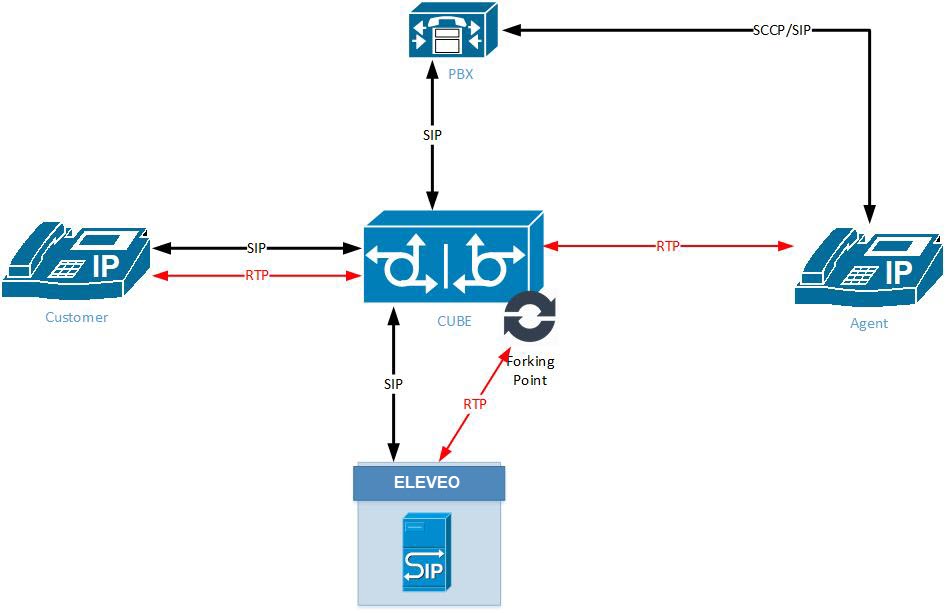
ASR requires configuration on CUBE only, there is no need for configuration on the CUCM side.
ASR enables recording of all calls that go through the CUBE and it doesn't need a JTAPI connection to CUCM, therefore the non-JTAPI devices such as Cisco Jabber clients without CTI support can be recorded. For a list of Cisco Jabber Clients with CTI support, refer to the Cisco Devnet site.
To record internal calls, it is necessary to configure network so that all internal calls go through the CUBE.
Disadvantages:
-
The Call Recording server accepts ALL recording sessions going through ASR/CUBE regardless of the pre-configured CR recording rules. The standard Recording Rules are ignored. To limit the recording to a specific range, it is necessary to create a DO NOT RECORD rule for all numbers except those that needs to be recorded.
Important information related to Recording Rules:
Recording rules are evaluated for all recording methods, including SIPREC. Rules are processed top-to-bottom and evaluation stops at the first matching rule — if a RECORD rule matches first, any DO NOT RECORD rule for the same extension below it is never evaluated.
The only difference in SIPREC behavior is the default action when no rule matches:
-
SIPREC records the call regardless. This is why calls are recorded via SIPREC even when no recording rules are configured.
To exclude a specific extension or range from SIPREC recording, create a DO NOT RECORD rule for that extension and place it above any RECORD rule that matches the same extension.
Example: To prevent extension 34666 from being recorded via SIPREC, create a DO NOT RECORD rule for 34666 and place it above any other rule matching that extension.
Recording Rules in Combined SIPREC(CUBE) and JTAPI Deployments
In installations where SIPREC and JTAPI Active Recording are connected to the same Eleveo server, each method handles unmatched calls differently:
-
SIPREC — if no recording rule matches, the call is recorded by default.
-
JTAPI — if no recording rule matches, the call is not recorded by default.
When both methods are connected to the same Eleveo installation, recording rules apply to both simultaneously. This produces the following outcomes:
|
Rule configured |
SIPREC |
JTAPI |
|---|---|---|
|
No rules set |
Recorded |
Not recorded |
|
RECORD rule matches |
Recorded |
Recorded |
|
DO NOT RECORD rule matches |
Not recorded |
Not recorded |
Rule order determines which method records a call. Rules are evaluated top-to-bottom and evaluation stops at the first match. Place more specific rules above general ones to ensure the correct rule is applied.
Active Recording
An active recording captures the call data and the call stream through a direct connection with the Cisco Unified Communications Manager (CUCM).
Achieves close to 100% capture reliability.
Additionally, other call data contained on the platform can be captured and stored in Call Recording.
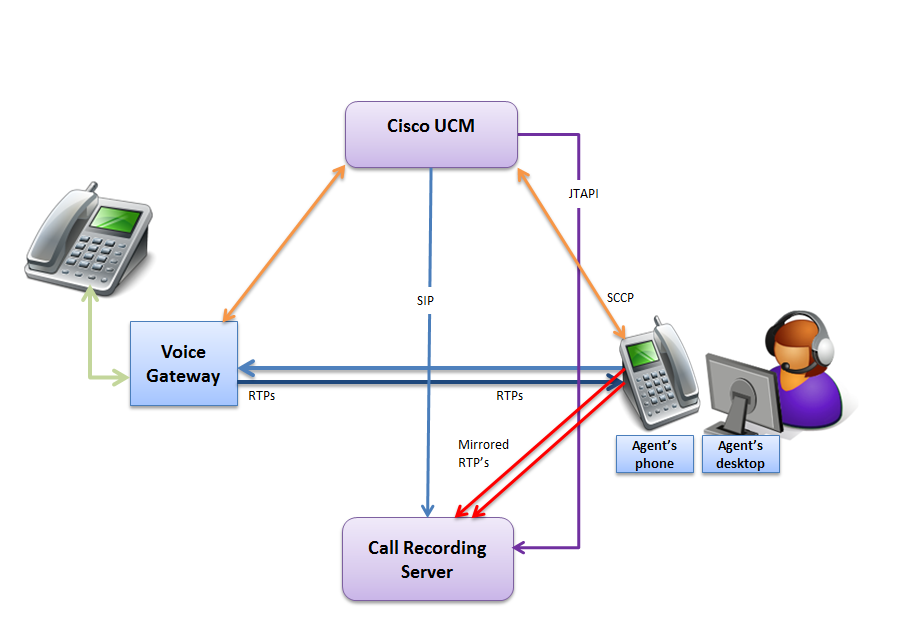
CUCM identifies the calls to be recorded based on recording profiles. When a call with a valid recording profile is detected, the voice stream is copied directly to the Call Recording recorder server. When the calls are decoded, they are immediately available within the Call Recording web-based user interface. Cisco also refers to this method as phone-based media forking or device-based recording.
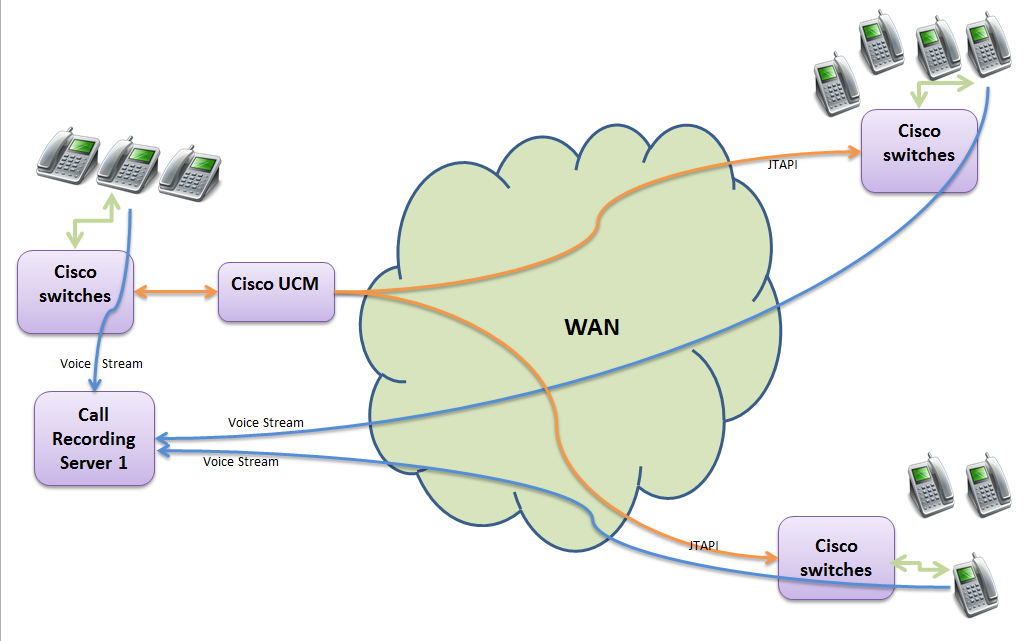
Advantages:
-
Doesn't use SPAN ports
-
Easy to administrate
-
Adaptable to network topology
-
There is no need for each site to have its own recorder.
-
Because the CUCM is aware of recording it can supply notification tones when legal compliance is required.
-
Active recording increases reliability and control.
Disadvantages
-
Only Cisco 3G IP phones and newer can be recorded through Active Recording. For an up-to-date list of all Cisco phones that support Active Recording see the Unified CM Silent Monitoring Recording Supported Device Matrix or the CTI (TAPI/JTAPI) Supported Device Matrix.
Cisco Selective User Recording
The Selective User Recording represents a variation of the Cisco Active Recording with JTAPI described in the section above.
When a call with a valid recording profile is detected and the user, press the Record button, the voice stream is copied directly to the Call Recording recorder server.
The typical use case for the Cisco Selective User Recording is a situation within a company back office or even a Call Center where for any reason it's not necessary to record all interactions, only those of particular interest are to be recorded. The user can stop and restart the recording at any time during the call using the Record and Stop keys, which is also useful for PCI DSS compliance. The sections of the call which were not recorded are represented as silence.
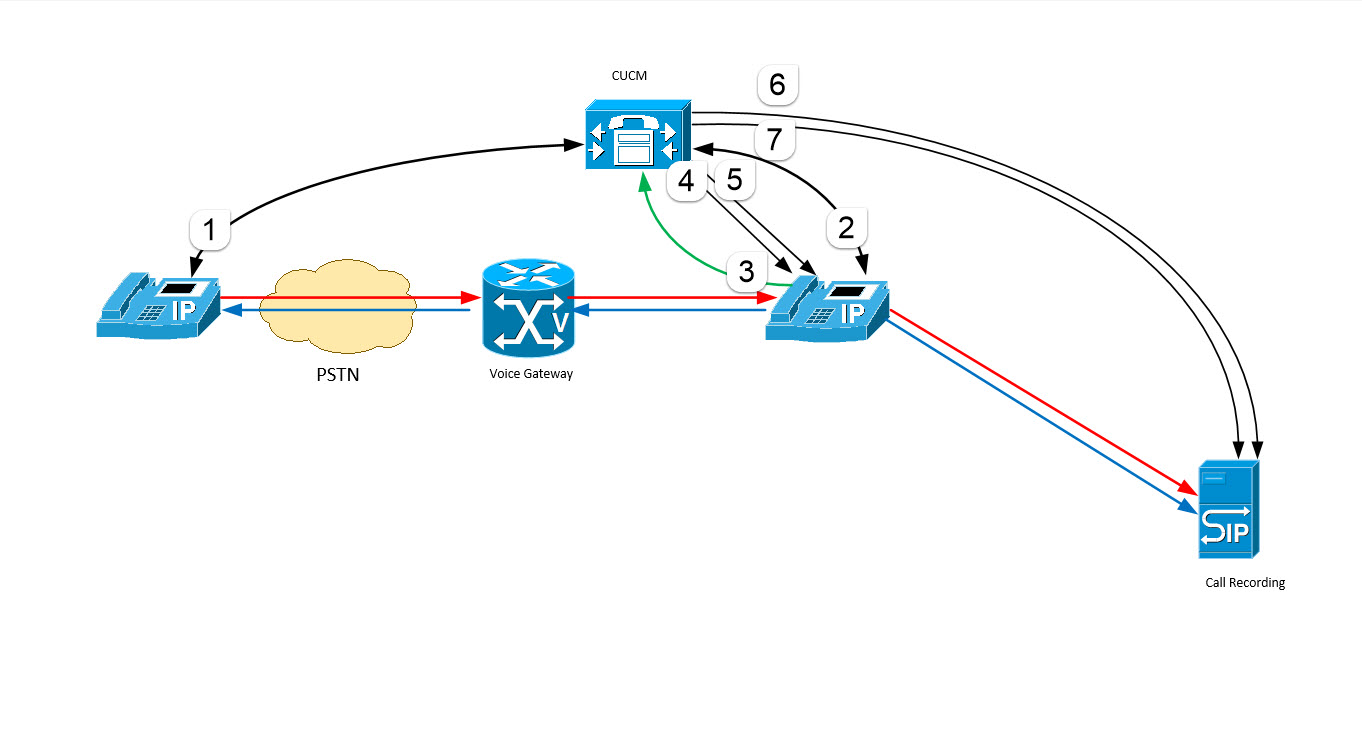
Selective user recording call flow:
-
Steps 1 and 2: A call is received and answered on a line configured for selective recording.
-
Step 3: The Agent starts the recording session by pressing Record.
-
Steps 4 and 5: Cisco Unified Communications Manager automatically sends two call setup messages to the BiB (Called) device: one to set up the media stream from the called party and the second to set up the media stream from the calling party.
-
Steps 6 and 7: Cisco Unified Communications Manager sends an INVITE to the recorder via SIP trunk for both calls.
-
The recorder accepts both calls and receives two RTP streams from the device BiB.
-
The phone displays the status of the recording session. The Agent uses Stop key to Stop Recording.
Disadvantages
-
Selective User Recording only works if Recording Rules are NOT set.
Cisco Basic Selective Silent Recording
The Basic Selective Silent Recording is a variation of Cisco Active Recording with JTAPI described in the section above.
The use of Basic Selective Silent Recording will significantly decrease your network traffic when only a defined portion of customer interaction needs to be recorded.
Contact center supervisors and/or to the Recording Server can select which calls to be recorded temporarily based on business rules and events.
When in progress, the Silent recording is indicating the recording to both call participants by a silent beep tone every 20 seconds.
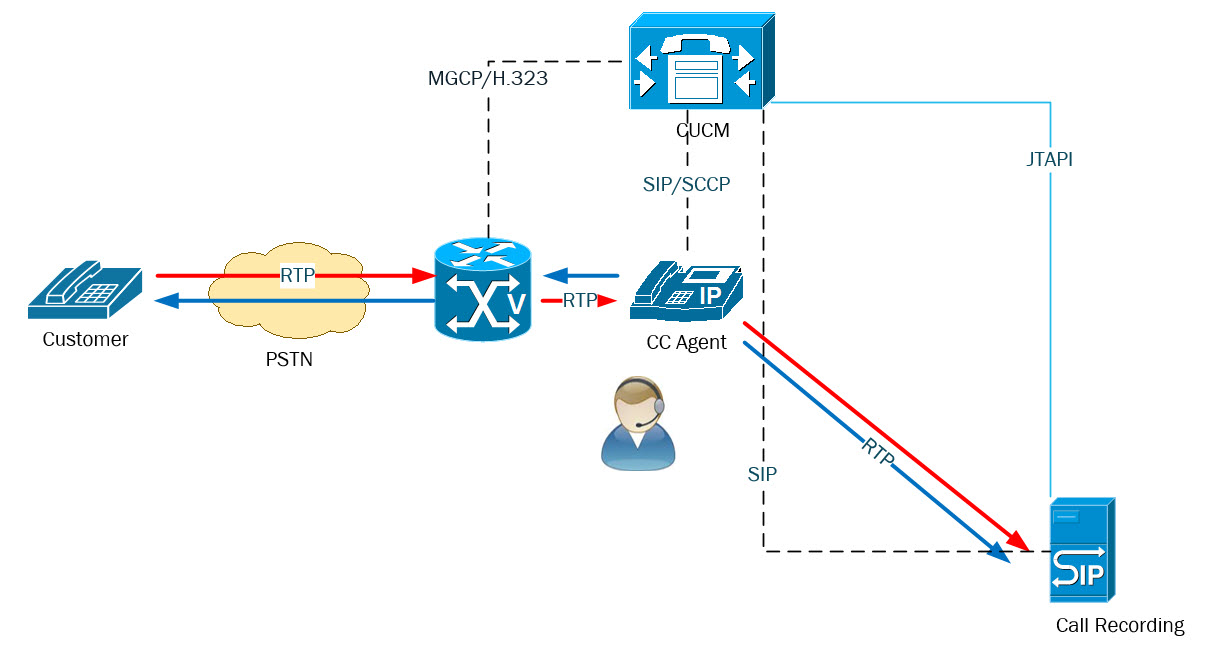
Selective silent recording call flow:
-
A call is received and answered on a line configured for selective recording.
-
The CUCM sends a JTAPI message to the recorder which according to its recording rules request or reject the recording session.
-
CUCM sends upon the request two call setup messages to the BiB (Called) device: one to set up the media stream from the called party and the second to set up the media stream from the calling party.
-
CUCM sends an INVITE to the recorder via SIP trunk for both calls.
-
The recorder accepts both calls and receives two RTP streams from the device BiB.
Cisco Active Recording Integrated With UCCE/PCCE
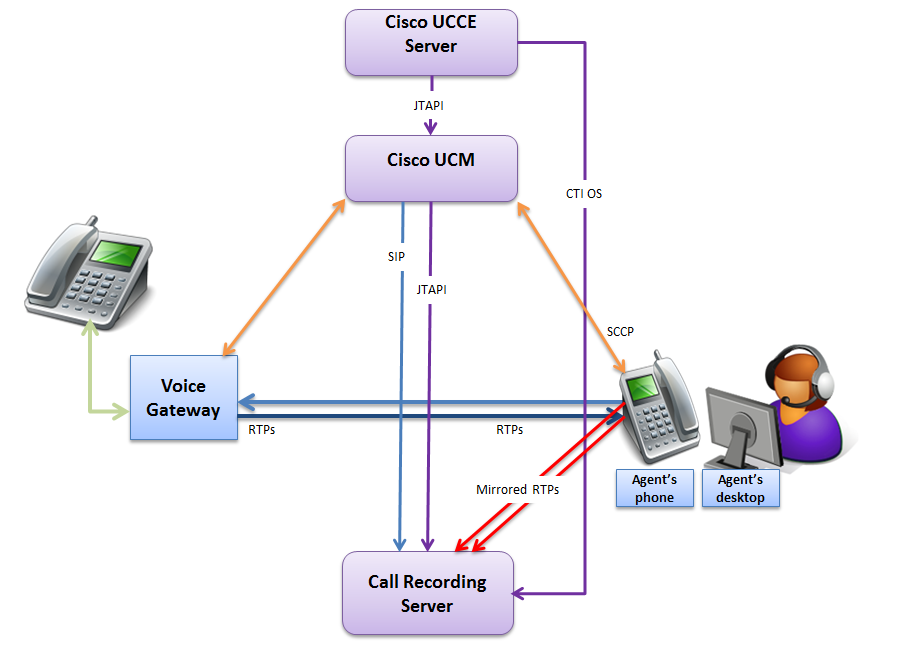
In addition to active recording the integration with UCCE can provide additional service-related information provided through CTI protocol:
-
Service
-
Agent
-
Skill Group
-
Caller Entered Digit
-
User Variables
-
Wrapup Data
-
etc
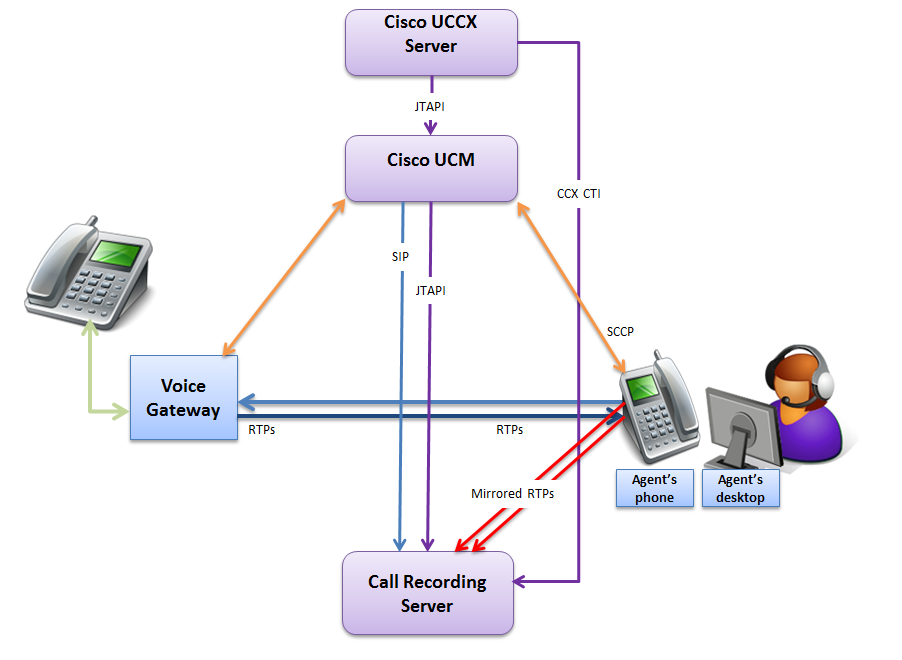
Active Recording Integrated With UCCX
In addition to active recording the integration with UCCX can provide additional service-related information provided through CCX CTI protocol:
-
Service
-
Agent
-
Skill Group
-
Caller Entered Digits
-
User Variables
-
Wrapup Data
-
etc