
Click User management > Authentication in the navigation tree on the left. The Authentication password policy screen opens.
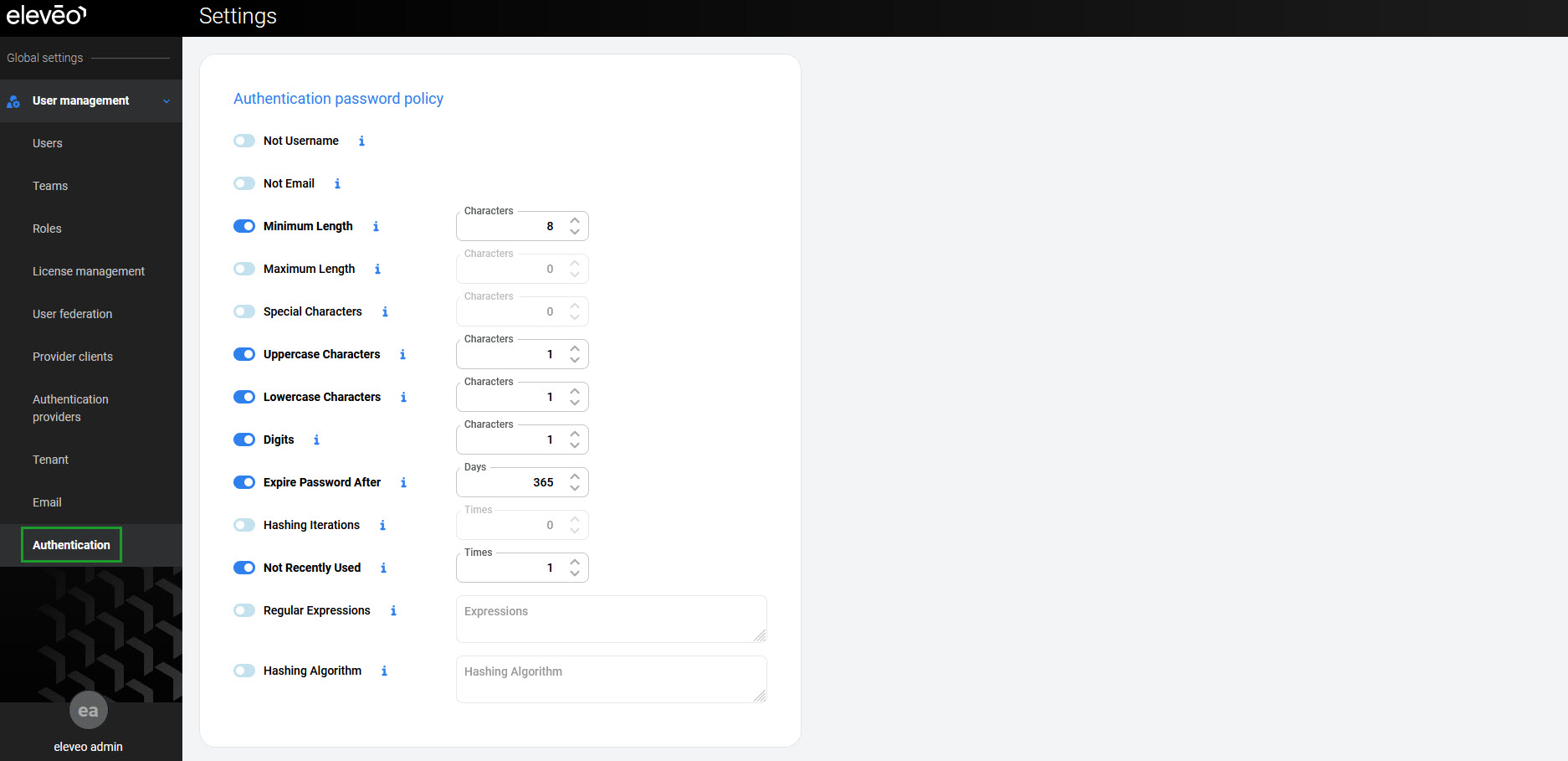
Default Password Policies
Eleveo default settings require that new passwords meet the following complexity requirements:
-
Minimum Length – at least eight characters
-
Digits – at least one digit (0–9)
-
Lowercase Characters – at least one lowercase letter (a–z)
-
Uppercase Characters – at least one uppercase letter (A–Z)
The following additional policies also apply:
-
Expire Password After – password expires after 365 days; a change is required after this period
-
Not Recently Used – password cannot match the previous password
All policies listed above are enabled by default.
Modifying Password Policies
The following policies can also be enabled or modified:
-
Not Username – username cannot be used as a password
-
Not Email – email address cannot be used as a password
-
Maximum Length – password cannot exceed this length
-
Special Characters – password must contain at least this number of special characters
-
Hashing Iterations – number of hashing iterations
-
Regular Expression – passwords must match this regular expression
-
Password Blacklist – expressions that cannot be used as a password
-
Hashing Algorithm – hashing algorithm used for the password
To enable an additional policy, toggle the switch on. Each policy has a default value that can be modified. To disable a policy, toggle the switch off.
Click Save to apply the changes.