
Purpose
This document explains the updated Eleveo product life cycle policy, including release dates and end-of-support timelines for different product versions, as well as the release policy that has been in effect since 2025. By outlining these policies, we help users make informed decisions about maintenance and upgrades, ensuring they can fully benefit from Eleveo features.
Terminology
|
Customer |
An individual or organization that uses Eleveo products. |
|---|---|
|
End of Maintenance (EOM) |
The date on which maintenance will end and the last Patch Version will be distributed. |
|
End of Support (EOS) |
The date on which support for a specified version will no longer be provided. |
|
Last Order Date (LOD) |
The date on which the last orders for the version will be taken. |
|
Patch Release |
These are releases of a product version that involve minor alterations to fix bugs that have been reported. These are indicated by the following versioning: “X.Y.Z” where the final digit is greater than 0. Example: 10.0.1 |
|
Minor Release |
These are releases of new versions of a product, including new features, enhanced technology, and functionality. These are indicated by the following versioning: “X.Y.0”, where the Y (middle digit) is incrementally higher. Example: 10.1.0 |
|
Major Release |
A Major Release is a release of a product that contains a specific feature set or introduces a significant change in software or technology that breaks backward compatibility. Versions are defined by the first digit of a version number, EG, 9.X.X = Version 9. Each version has at least one Minor Release (see above) where new features are made available to the Customer, and several Patch releases (see above). |
|
Build number |
Indicates the currently installed build. This number references the current feature set and/or bug fix that is currently installed. It may be requested by our support engineers. |
|
Partner |
An individual or organization that resells or distributes Eleveo products either as a separate solution or integrated into another solution, either as a separate piece of software or under a partnership agreement. |
|
Technology |
Form, operation and implementation of components in a product. |
|
Eleveo Cloud Native (ECN) |
The most up-to-date Software as a Service version available.
Please refer to the release notes for more information. |
|
Cloud Feature To Market Version (CLOUD) |
Any version listed as CLOUD is provided as a Software as a Service.
Please contact your local Eleveo representative for a detailed breakdown of what is supported in the cloud. |
|
Feature To Market Version (F2M) |
An on-premise version where a regular release schedule will be followed.
|
|
Long Term Supported Version (LTS) |
Any on-premise version listed as LTS will be supported for at least two years. LTS versions and the timeframe during which they will be supported are listed on the help portal.
|
F2M version– Eleveo supports On-Premise, Hybrid and Cloud installations. The cloud version is automatically upgraded at regular intervals.
Hybrid Deployments – On-premise versions that are older than one year are not supported for hybrid installations (On-prem + ECN). To leverage a Hybrid installation, please ensure that your on-premise installation is updated regularly. Hybrid deployments are NOT supported for the LTS version!
ECN – The ECN version is automatically upgraded at regular intervals. Please refer to the release notes for information about individual releases.
Detailed Description of the Varying Policies
Irrespective of which software release cycle is chosen, Eleveo remains dedicated to providing exceptional customer service and support. The primary difference between versions is the stability provided by the LTS version OR access to new features as they become available. Customers who prefer stability in infrastructure requirements or who do not require that new features be deployed with every release should choose the LTS option.
Eleveo Cloud Native (ECN)
Eleveo provides WFM and WFO as a service for customers using cloud-only recording solutions and for those customers who wish to have early access to new features but do not want to expand their current hardware footprint(hybrid installations). An ECN deployment does away with the need for on-premise hardware as it is deployed and maintained by the Eleveo Service and Support team in a secure Eleveo cloud. Clients who wish to take advantage of new features as they are available can take advantage of the ECN version. Near-monthly updates enable users to take advantage of new features as they are developed.
Example version numbering schema: ECN-2025.09.01 --> ECN-2025.10.16
Cloud Feature To Market Version (CLOUD F2M)
Eleveo provides WFM and WFO as a service for customers using cloud-only recording solutions and for those customers who wish to have early access to new features but do not want to expand their current hardware footprint. An Eleveo Cloud deployment does away with the need for on-premise hardware as it is deployed and maintained by the Eleveo Service and Support team in a secure Eleveo cloud. Clients who wish to take advantage of new features as they are available can take advantage of the Cloud version. Regular releases (both minor and major) will enable users to take advantage of new features as they are developed. For more details and information about changes, or to hear more about upcoming cloud-based features, please contact your local Eleveo representative.
Example version numbering schema: 25.10.23.61 → 25.11.03.62
Feature To Market Version (F2M)
Smaller - or more demanding - clients who wish to take advantage of new features as they become available and who do not mind being obliged to increase their hardware footprint occasionally should take advantage of the Feature to Market Version cycle. Regular releases (both minor and major) will enable this release track to take advantage of new features as they are developed, with minor versions providing regular bug fixes. As new features are developed or as new back-end processes are deployed, there may be an increase in Hardware Requirements between releases, both major and minor. Eleveo undertakes to inform Partners at the earliest possible opportunity of these changing requirements. However, performance may be affected after an upgrade is performed if the additional hardware requirements are not met in a timely manner.
Example version numbering schema: 10.0.0 → 10.1.0 → 10.2.0 → 10.x.0
Long-Term Supported Version (LTS)
The requirement that customers purchase or requisition additional resources between releases may be onerous for some corporate clients who do not require new functionality immediately as it becomes available. For customers who have a specific calendar that defines their server downtime, this LTS model will reduce the time taken to perform an update. Deploying an LTS version may be desirable as it will ensure stability in hardware demands, while it will also provide bug fixes at regular intervals. No new features will be added to the LTS version! It will be distributed as is, with only critical bug fixes being provided in the form of a patch. If a customer wishes to enhance their installation to take advantage of a new feature, they will have to install the F2M version. Corporate clients with long lead times on installation, as well as existing corporate clients, may wish to follow this model, as there will be no major change in the code between patches. There will be no exception to the rule that: New features will be deployed only for the F2M version. Hybrid deployments are NOT supported for the LTS version!.
Example version numbering schema: 10.0.0 → 10.0.1 → 10.0.2 → 10.0.x
Support Timeline
The Eleveo CLOUD development cycle closely mirrors the release cycle for the standard Feature To Market Version (F2M). With new features and bug fixes being applied at regular intervals.

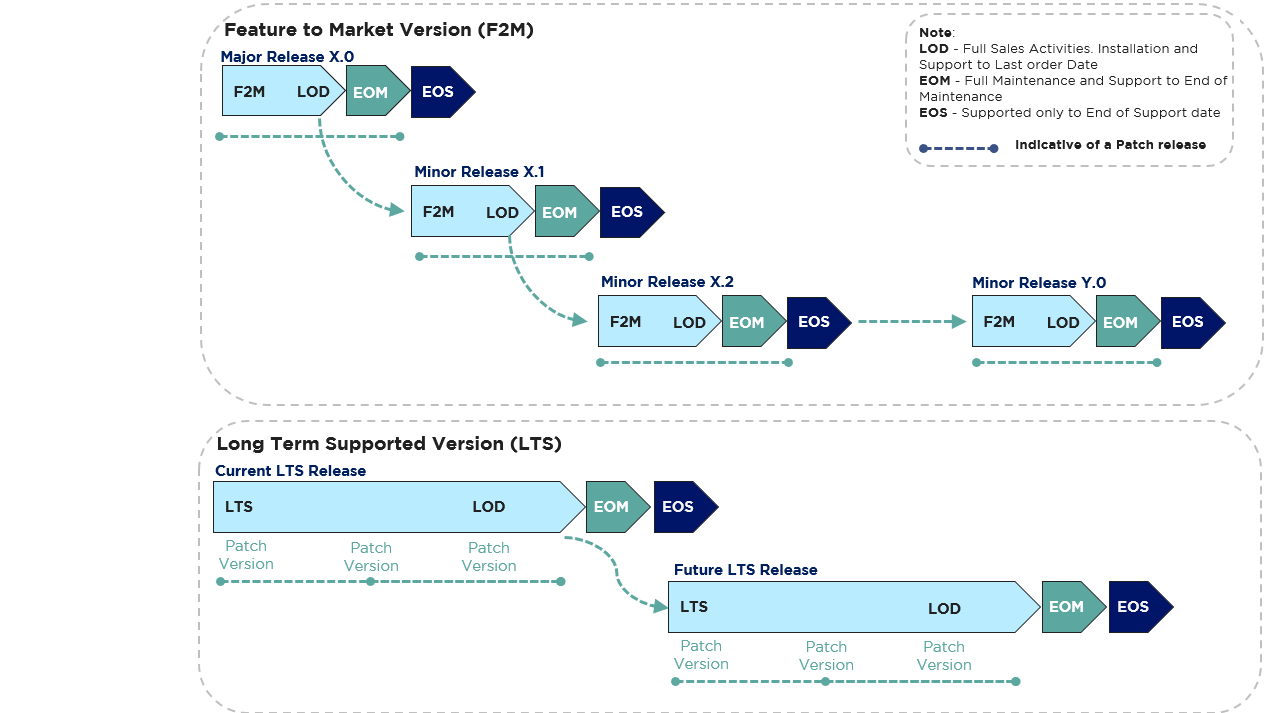
General Rules
We aim to ensure forward compatibility during the lifecycle of a major version(subject to certain restrictions). Most minor versions or patches can be installed on any older version throughout the same release model without breaking the existing functionality. A new version of a package may require the installation of additional packages as a prerequisite for the F2M Release model.
Eleveo supports the whole major release as such, e.g. 10.x. However, customers are required to stay on one of the supported minor releases in order to keep the maintenance contract active.
Example:
We will provide support only for a limited number of major release candidates. Usually, only one of each version will be supported at a given time.
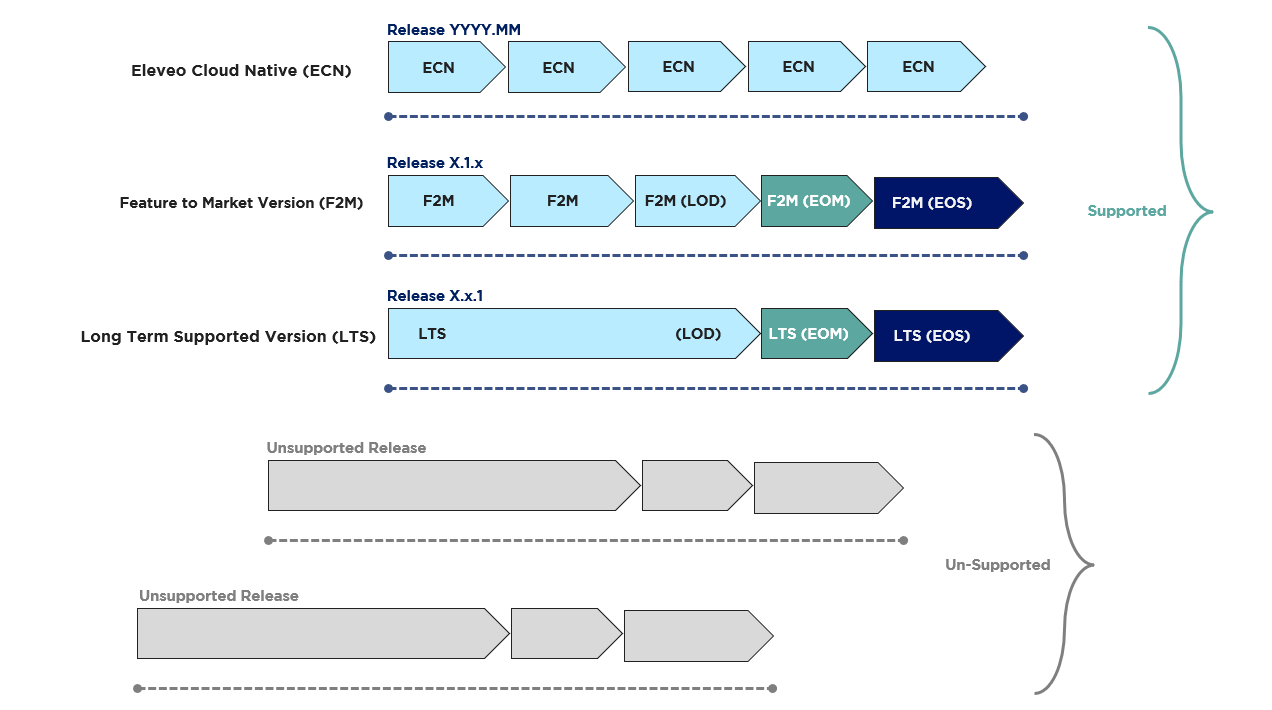
Release Timeline
Each model has a slightly different timeline for the release and update schedule. Both result in regular bug releases along the following lines:
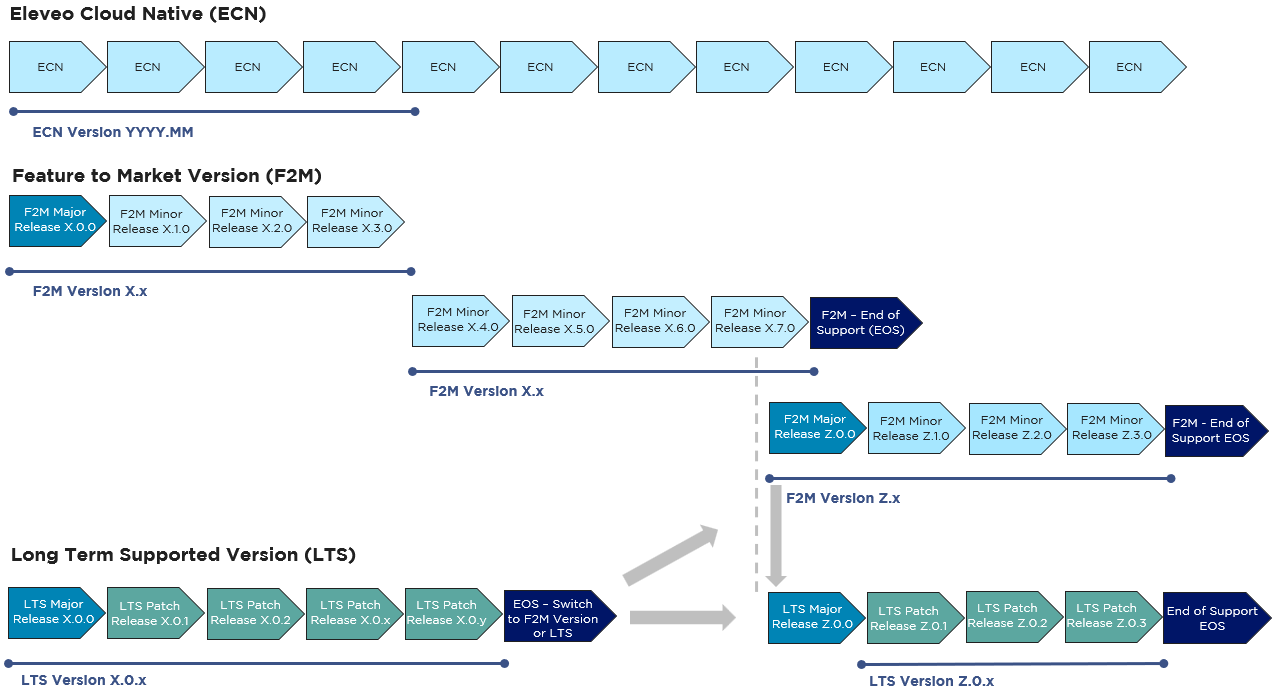
Timeline – Eleveo Cloud Native (ECN)
The ECN version release model will be supported indefinitely. In general, it is anticipated that customers using the ECN model will be upgraded to the most up-to-date version on a regular basis.
Please note that for Hybrid Deployments – On-premise versions that are older than one year are not supported for hybrid installations (On-prem + ECN). To leverage a Hybrid installation, please ensure that your on-premise installation is updated regularly. Hybrid deployments are NOT supported for the LTS version!
Timeline – Long-Term Supported Version (LTS)
The LTS release model will be supported for a minimum period of two years. It is anticipated that any customers using the LTS version will be upgraded to the most up-to-date version at the end of the two-year cycle.
Within this LTS version, the following release format is expected to be followed:

Major Release
This LTS Version is supported for, at minimum, 24 months, irrespective of the actual minor or patch version number.
Minor Release
Minor releases. There will be no minor release provided for the LTS version. If new features are required by a customer, they will have to upgrade to a newer version. This may result in the need for regular updates.
Patch Release
Patch releases are produced approximately every 3-6 months. All patch releases are backward compatible. Patch releases provide only bug fixes. A new version of a package may require the installation of additional packages as a prerequisite. Example naming convention: X.X.0, → X.X.2,→ X.X.3
Timeline – Feature To Market Version (F2M)
The F2M version release model will be supported on an ongoing basis. In general, it is anticipated that customers deploying the F2M model will be upgraded to the most up-to-date version at the end of the two-year cycle.
Within this F2M version, the following release format is expected to be followed:

Major Release
Only the most recent release is supported, irrespective of the actual minor or patch version number. Major releases are provided regularly when we release significant new functionality, a significant technology update becomes available, or when it is no longer possible to guarantee backward compatibility. Example naming convention: 8.0.X, 9.0.X
Minor Release
Minor releases are produced approximately every 3-6 months. All minor releases within the same version are backward compatible. Minor releases from different versions are not backward compatible (e.g. ver. 8.Y.Z is not compatible with Version 9.Y.Z). Each minor release brings new functionality in addition to bug fixes. A new version of a package may require the installation of additional packages as a prerequisite. Example naming convention and upgrade path: X.2.X → X.3.X
Only the most recent release will be supported!
Patch Release
Patch releases are produced approximately every 3-12 weeks. All patch releases within the same minor release are backward compatible. Patch releases generally only provide bug fixes. A new version of a package may require the installation of additional packages as a prerequisite. Example naming convention and upgrade path: X.X.0, → X.X.1,→ X.X.2
Patching
The most recent patch version will fix minor enhancements required to resolve known issues or software bugs.
If the Customer applies a patch, it may happen that the new functionality appears in the code when following the F2M model.
Upgrading between major versions may require multiple steps!
Eleveo Cloud Native (ECN)
Updates are released regularly and automatically.
Long Term Supported Version (LTS)
LTS bug fixes will be provided in the form of an ISO image. They will not lead to enhanced hardware demands and will not provide additional (new) functionality.
Feature To Market Version (F2M)
F2M bug fixes will be provided in the form of an ISO image. They may lead to enhanced hardware demands and may provide additional (new) functionality.
OS Security Updates
Eleveo maintains the security and integrity of our appliance by promptly updating vulnerable packages whenever Rocky Linux releases a new version. Eleveo includes these changes in the next Eleveo release (up to 12 weeks after Rocky Linux publishes the changes, usually sooner). Note that customers are forbidden from modifying the operating system provided as part of the Eleveo ISO. Customization may cause instability or negatively impact the product's functionality. This policy ensures that our ISO remains stable, secure, and reliable while providing users with the latest security fixes.
Exceptions
Eleveo reserves the right to depart from the life cycle policy shown above in the following situations:
-
Situations may arise between patch releases within a version where the technology that provides certain functionality is replaced by newer technology providing the same functionality. In these cases, the older technology will no longer be supported for the affected version once the newer technology has been released.
-
Situations arise where fixes for a certain bug may require a change in the version’s technology. In these situations, the fix for the bug mentioned will be incorporated into the next version.
-
Where the release cycle between versions has been extended or curtailed, this may reduce or prolong the lifecycle of previous versions from the periods specified above.
Where such departures are likely to occur, Eleveo undertakes to inform Partners at the earliest possible opportunity.
Upgrade Policy
Eleveo provides an automatic upgrade script that supports direct upgrades for recent major versions. The matrix of currently supported upgrades using the automated script are listed on the page named Upgrade Matrix. If the source version is not listed on the upgrade matrix it means that a multi-step upgrade process is required. e.g. Upgrade or migrate data to the most recent supported version, and then upgrade to the most recent supported version.
At the time of writing, the following upgrades are supported:
Fully supported:
-
Upgrades from the latest version 9.x to version 10.x are supported.
-
When moving from V 8.x to 10. It is mandatory to first migrate to v 9.7 and then upgrade to v 10.x.
Limited support:
-
Migration of user data from older versions of Eleveo (6.x, 7.x and 8.x) is not possible due to significant changes in the implementation of User Management! It is technically possible to move data, please consult the Upgrade Guide for up-to-date information.
Important information about the F2M and LTS versions:
Eleveo supports any customer who decides to move from a supported LTS version to a F2M version in order to take advantage of new features released in the future.
-
It will NOT be supported to switch from an F2M to an LTS version; this would require a fresh installation!
Client Backward Compatibility
Eleveo client applications (e.g. Eleveo Recording Bot (ERB), Screen Capture Client) must be upgraded only after the Replay has been upgraded. The Replay server remains backward-compatible with client versions released up to one year ago. Clients for manual installation are available for download from the Eleveo portal.