
If you use an Android device, it is necessary to add the calendar from a laptop or personal computer. It is not possible to import the calendar from the phone itself.
Adding iCal URL to Google Calendar
Follow the steps below to add your My Schedule Calendar to your Google Calendar:
-
Go to calendar.google.com in a browser.
-
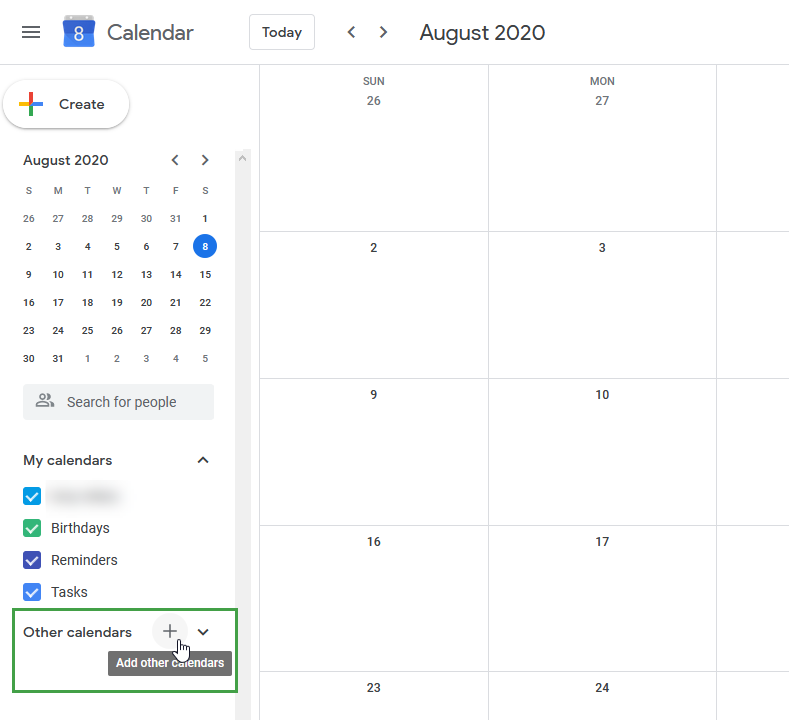
Click the plus sign next to Other Calendars on the left side.
-
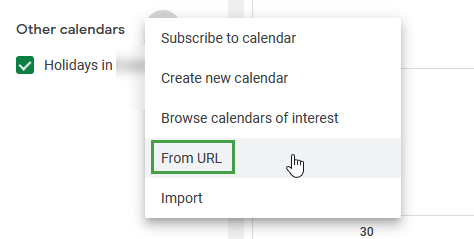
Choose From URL.
-
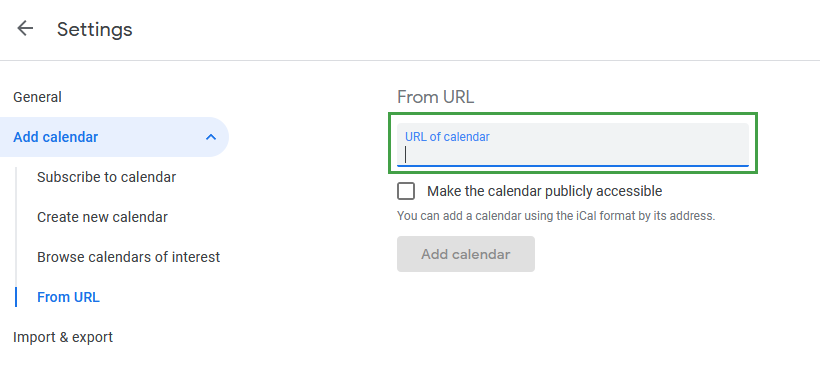
Paste the copied URL (from the previous step) into the URL field.
-
Click Add Calendar and wait for Google to import your events.

It may take some time for the calendar data to display.
If Calendar Does Not Display
If the calendar is not showing up on an Apple® device:
Apple users may find that, even after adding a calendar in Google Calendar, it may not show up on their devices. This occurs because sync is turned off by default for new calendars.
To ensure that the calendar synchronizes, follow these steps:
-
Go to your Google Calendar in a web browser.
-
Modify the URL to https://calendar.google.com/calendar/syncselect
-
Select the calendar you want to sync. Ensure that the box is selected.
-
Click Save.
It can take a few minutes before the calendars appear. Close all active browsers and re-open the calendar to check that it displays the updated content.
"IOS is a trademark or registered trademark of Cisco in the U.S. and other countries and is used under license."
"Apple, iCloud and iPhone are trademarks of Apple Inc., registered in the U.S. and other countries."