
Supported for CLOUD Deployments + on-premise DEPLOYMENTS + Hybrid Deployments
What is Cisco Webex Contact Center
Webex Contact Center is a cloud-native, omni-channel contact center as a service (CCaaS) offering provided by Cisco. The customizable platform includes omni-channel contact options including chat, text, social, email, or call. It integrates with the Webex suite of products—Webex Calling, Messaging and Meeting tools—which can all be managed through a single, unified hub.
Eleveo Webex Contact Center Integration
Webex Contact Center initializes all the recordings, with Cisco maintaining all triggers and business rules to initiate contact capture. After the initial service setup and its authentication against the WebexCC API, Eleveo queries the API at regular intervals and pulls any new voice recordings created since the last import to Eleveo’s Conversation Explorer tool. This API is the only integration point, and there is no further manual authentication required. After the contacts are imported, recordings are available for search, playback, Quality Management purposes, and media lifecycle management. The Eleveo integration also supports the automatic synchronization of users and groups from Cisco Webex Contact Center, this enables user access to Eleveo Quality Management via SSO, unified User Management for QM Evaluations and (if enabled) access to features provided by Eleveo WFM. Eleveo also supports the import of historical data to WFM, configuring the import ensures that Eleveo can create accurate forecasts and schedules while also providing historical adherence reports.
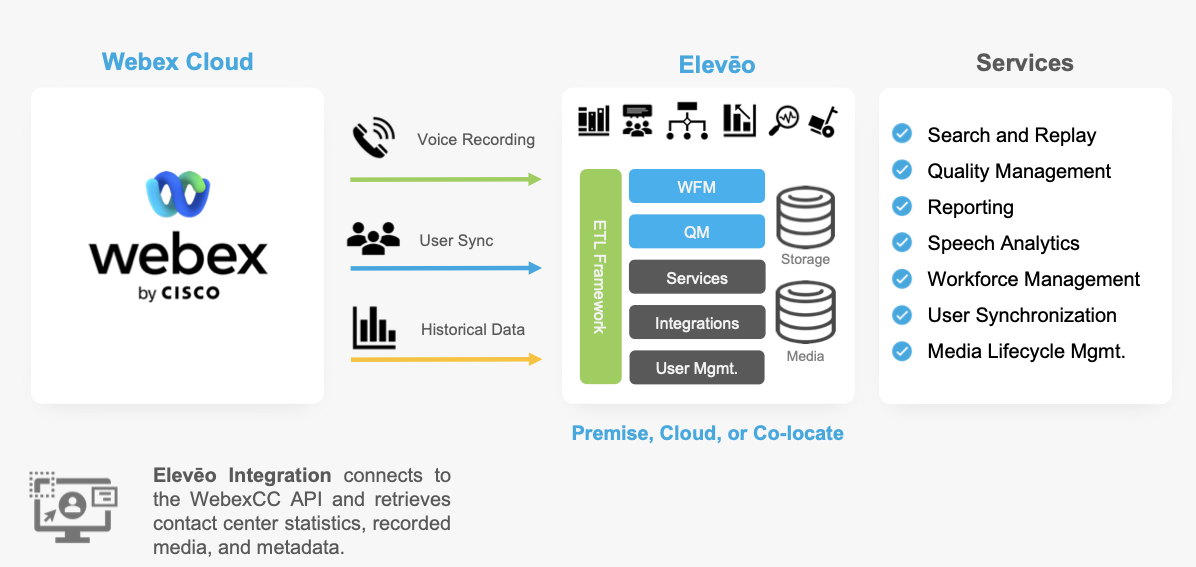
Supported Integration Use Cases
Eleveo supports integrations for the following purposes:
-
Import of Media – Voice Recording – Recording of Webex CC is achieved by retrieving a recording from the Cisco server after the recording has been completed.
-
Users and groups import – Ensure that the correct users and groups are matched to media recordings
-
User Authentication and Single Sign On (SSO) – Single Sign On allows users to access Eleveo applications without the need to store their user credentials within the Eleveo User Management application
-
Conversation Explorer – Search, view, and playback recorded media
-
Quality Management – Perform quality reviews from within Eleveo Quality Management
Encoding and Encrypting Webex CC Media files to MP3
Media can be converted and encrypted automatically based on the configuration defined by an administrator of the Eleveo Solution.
What Is Supported
|
Feature |
Webex CC |
|---|---|
|
Audio Recording |
|
|
Screen Capture (via separate Eleveo CCaaS Screen Capture client) |
|
|
User Import |
|
|
SSO (User Authentication) |
|
|
Conversation Explorer |
|
|
QM (Reviews) |
|
|
Speech Recognition |
|
|
Speech Generative AI |
|
|
Live Monitor |
|
|
Voice of the Customer |
|
|
WFO Analytics (Reports + Dashboards) |
|
|
WFM (historical data) Manual+Automatic |
|
|
WFM Intraday |
|
|
WFM Real Time Adherence |
|
FAQ
Q: Can we configure recording to only occur during scheduled working hours?
A: Yes, it is possible to configure a recording schedule within the Webex Contact Center administration interface. Refer to the Webex documentation for more details – https://help.webex.com/en-us/article/n5595zd/Webex-Contact-Center-Setup-and-Administration-Guide#Call-Recording. Eleveo will download all recordings that have media and are recorded by Webex Contact Center.
Q: Can we import only media, without synchronizing users or historical data for WFM?
A: Yes, it is possible. This configuration works the same way as with previous integrations, such as the UCCE integration for calls. For example, it is possible to configure the integration to import media only, without configuring the user import. However, if you want to match agents and their recordings at a later time, it will be necessary to synchronize the users first (using User Management) and then sync them to the OSE database. This requires some additional manual configuration to be performed at the database level.
Q: Can the user* be limited to seeing a subset of users/teams that need to be imported?
A: Eleveo requires the user for the following tasks / and with the following access level:
- The creation of the integration (i.e., to get clientID/secret and later a refresh token). This integration is essentially a system account that Webex requires.
- To have the correct privileges to view recordings over the API. When downloading the media, we are downloading them on the user’s behalf, using their access permission. To be more precise, the Webex CC Media Importer does not currently restrict or limit what can be downloaded.
Q: Does the user* account need to exist/be enabled during the entire time that the integration is in use, or can it be used only to authenticate the integration and then be disabled/deleted?
A: The user* account must exist the entire time that the integration is in use because the Eleveo integration is acting on its behalf.
NOTE: The WebexCC user* used must have a valid license for WebexCC.
Q: What happens if the user’s password is changed?
A: Nothing happens. As long as the token is valid and stored on the Eleveo side, everything will continue to work. Once the token expires, it is necessary to log in as the user* and obtain a new token.
Q: How often must the integration be validated (if not running)? Is it configurable at the level of the WebexCC tenant, and how is the user notified that this is required?
A: The refresh token is currently set to 60 days, but please note that it can be changed on the Cisco side at any time. We are not aware of an option to define this for a tenant or for an entire organization. If the token is removed/deleted/invalidated for any reason, Grafana creates an alert for the user.
*As a user here, we consider the user account with the Contact Center Administrator role assigned, as described in the green box at the top of the screen.
Q: What happens to Webex CC recordings (on the WebexCC Server) after they are downloaded to the Eleveo on-premise/cloud solution?
A: Nothing happens. All recordings are kept on the WebexCC server for 13 months and then deleted.